Monday, 24 April 2017

"Unable to connect to remote server" error in AX2012 R2

"Unable to connect to remote server" error in AX2012 R2


Go to Reporting Services Configuration Manager.

1. Change the server account to local account.
2. Remove the SSL if configured.
3. Go to C:\Program Files\Microsoft SQL Server\MSRS11.MSSQLSERVER\Reporting Services\ReportServer\rsreportserver.config
4. In rsreportserver.config Change the SecureConnectionLevel value to "0"
Restart the sql server reporting service.

Thursday, 30 March 2017

How to get query sum value using X++ code in ax 2012

How to get query  sum value using X++ code in ax 2012 


static void querySumCustAmountMST(Args _args)
{
    Query                               q;
    QueryBuildDataSource                qbds;
    queryBuildRange                     qbr;
    QueryRun                            qr;
    CustTrans                           custTrans;

    q                                   = new Query();

    qbds    = q.addDataSource(tablenum(CustTrans));
    qbds.addSelectionField(fieldNum(CustTrans,AmountMST),SelectionField::Sum);
    qbr     = qbds.addRange(fieldNum(CustTrans,AccountNum));

    qbr.value(strfmt("1001"));
    qr = new QueryRun(q);
    
    while(qr.next())
    {
        custTrans   =   qr.get(tablenum(CustTrans));
        info(strfmt("%1",custTrans.AmountMST));
    }
}


Tuesday, 21 March 2017

How we can add custom Lookup on Morphx Report Dialog Box in ax 2012


How we can add custom Lookup on Morphx Report Dialog Box in ax 2012


Please find the Link for your reference.

https://dynamicsuser.net/ax/f/developers/92265/how-we-can-add-custom-lookup-on-morphx-report-dialog-box/486844#486844

You can get solution from this link.


Sunday, 5 March 2017

Like and Not like operation in ax 2012


Like and Not like operation in ax 2012

For Like operation:

static void likeOperation(Args _args)
{
    CustTable                         custTable;
    
    while select custTable where custTable.AccountNum like "1101"
    {
        info(custTable.AccountNum);
    }
}

For Not Like operation:

static void NotlikeOperation(Args _args)
{
    CustTable                         custTable;
    
    while select custTable where !(custTable.AccountNum like "1101")
    {
        info(custTable.AccountNum);
    }
}

Thank you

Thursday, 2 March 2017

Data getting using queries in ax 2012


Data getting using queries in ax 2012

static void AddRangeToQuery(Args _args)
{
    Query                               q = new Query();
    QueryRun                        qr;
    QueryBuildDataSource    qbr1,qbr2;
    str                                     strTemp;
    HPRWebUsers                 webUsers,webUsers2;
    EmplTable                        emplTable;
    ;
 
    qbr1 = q.addDataSource(tablenum(EmplTable));
    qbr1.addRange(fieldNum(EmplTable, EmplId)).value("f08*");
   
    qr = new QueryRun(q);

    while (qr.next())
    {
        emplTable = qr.get(tablenum(EmplTable));
        info(empltable.EmplId);
    }
}

Thank you...!

Tuesday, 24 January 2017

Enable or Disable Secuirty Policies in ax 2012 R2

Enable or Disable Secuirty Policies in ax 2012 R2

For my issues Security policies is working fine for all forms but particular transfer order form no need to work.

When i am getting the error while transfer items from one warehouse to another warehouse getting error.

I find the issues is InventSite table --> exist method.

So, i added below code for that.

static public boolean exist(InventSiteId  _inventSiteId)
{
    InventSite  inventSite;
    #define.InvalidContext('DisplayBrachData')
    boolean isFound;
    XDSServices xds = new XDSServices();
    // Disable the address book XDS by passing an invalid context string
    xds.setXDSState(0);
     select RecId from inventSite
                                 index SiteIdx
                                 where inventSite.SiteId == _inventSiteId;//.RecId != 0;
    isFound = _inventSiteId && (inventSite.RecId != 0);
    xds.setXDSState(1);
    return isFound;
}

Friday, 6 January 2017

Exception occurred on the metadata service on client or server in ax


Exception occurred on the metadata service on client or server in ax 

I am working on SSRS Reports getting a error while selecting a query.

For this error you have to refresh WCF Configuration file.

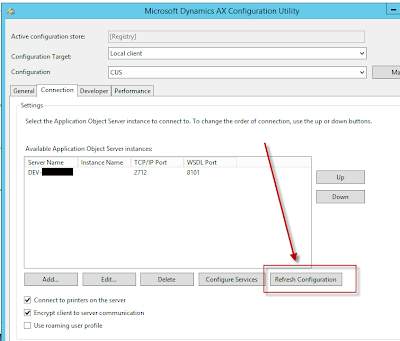
Go to :

Control Panel --> All Control Panel Items ---> Administrative Tools --> Open Ax 2012 configuration 

Click on the Refresh Configuration button. As shown below.

Note: For original Configuration file it is disable. For that you have to create a new configuration with same Server, TCP/IP and WSDL Port.


Close the visual studio and re-open it.